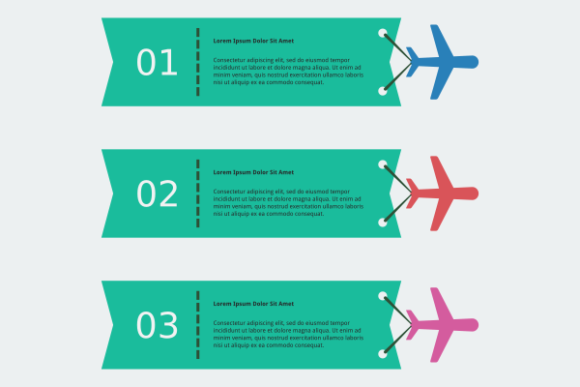
Airplane and Ribbon Infographic Template for Creative Projects
The Airplane and Ribbon Infographic Template is a versatile, flat-style vector design that combines a simple airplane graphic with flowing ribbon elements. This combination offers a clean, modern aesthetic that works well across a range of visual communication needs. Whether you're designing for travel, education, marketing, or personal projects, this template provides a strong visual foundation that's easy to customize and adapt.
Why This Template Stands Out
What makes the Airplane and Ribbon Infographic Template especially useful is its balance of simplicity and flexibility. The airplane symbolizes movement, journey, and exploration—making it ideal for travel-related content. The ribbon element adds a dynamic visual flow that can be used to highlight data, timelines, or key messages. Together, they form a cohesive design that supports both informational and decorative purposes.
Being an editable SVG, the template can scale to any size without losing quality. It's also compatible with Inkscape, a powerful free vector editor, making it accessible for designers of all levels. Along with the SVG file, you'll receive EPS, PDF, and high-resolution PNG formats, giving you flexibility across platforms and use cases.
Creative Uses Across Industries
This template is not limited to travel or aviation themes. Its clean, flat design makes it adaptable for a wide range of industries and storytelling needs. Here are some creative directions to consider:
- Travel Agencies: Use it as a banner or infographic to showcase popular destinations, flight deals, or seasonal promotions.
- Education: Create a visual timeline of aviation history or a geography lesson on global cities and flight routes.
- Marketing: Build a campaign visualizing customer journeys, brand evolution, or service pathways.
- Event Invitations: Customize the ribbon to highlight event dates, locations, or itineraries for travel-themed events.
- Infographics: Use the airplane as a visual metaphor for progress, growth, or transitions in business or personal development topics.
Design Tips for Maximum Impact
To get the most out of the Airplane and Ribbon Infographic Template, consider these design strategies:
- Color Consistency: Stick to a cohesive color palette that aligns with your brand or project theme. Flat design works best with bold, clean colors.
- Typography Choices: Pair the template with modern sans-serif fonts for a clean, contemporary look. Avoid overly decorative fonts that may clash with the minimal style.
- Layering Elements: Use the ribbon as a background layer for text or icons. This can help organize information while maintaining visual flow.
- Custom Icons: Add small icons or illustrations along the ribbon path to represent different points in a journey or timeline.
- White Space: Don't overcrowd the design. Allow space around the airplane and ribbon to maintain clarity and focus.
Adapting for Different Formats and Platforms
One of the biggest advantages of this template is its adaptability across formats. Here's how you can tailor it for different uses:
- Web Banners: Resize the SVG for use as a website banner or hero image. Use animated versions (if supported) to draw attention to promotions or announcements.
- Social Media: Crop and stylize the template for Instagram stories, Facebook posts, or Twitter headers that highlight travel themes or event updates.
- Print Materials: The high-resolution PNG and PDF versions are perfect for flyers, posters, or brochures. Use the ribbon as a decorative border or timeline graphic.
- Presentation Slides: Integrate the template into slides to visually represent journeys, processes, or comparisons in a clean, professional way.
- Email Newsletters: Embed the PNG version in email templates to create visually engaging announcements or travel-related content.
Who Can Benefit from This Template
The Airplane and Ribbon Infographic Template is designed with a broad audience in mind. Here's how different users can make the most of it:
- Graphic Designers: Save time with a ready-made layout that can be customized for clients in travel, education, or marketing industries.
- Content Creators: Enhance blog posts or social media visuals with a clean, engaging graphic that supports your message.
- Marketers: Use the template for campaigns, landing pages, or promotional materials that require a visual storytelling element.
- Entrepreneurs: Build branded visuals for travel-related services or event promotions without needing advanced design skills.
- Educators: Create engaging classroom materials that explain geography, history, or logistics in a visually appealing way.
- Freelancers: Offer value-added design options to clients by incorporating this template into your portfolio of reusable assets.
Staying Original While Keeping It Clear
While the template provides a strong base, the key to effective design is personalization. Avoid generic layouts by thinking critically about your audience and message. Ask yourself:
- What story am I trying to tell?
- How does the airplane or ribbon help visualize that story?
- Can I add unique elements that reflect my brand or content style?
- Is the design easy to understand at a glance?
Originality doesn’t always mean starting from scratch—it can come from thoughtful customization, smart layout choices, and intentional color and typography use.
Getting Started with Inkscape
If you're new to Inkscape, don't worry. The software is user-friendly and packed with features that make editing SVG files straightforward. Start by opening the Airplane and Ribbon Infographic Template and explore the layers panel to understand how the design is structured. You can change colors, adjust shapes, add text, or even combine the template with other graphics to create something truly unique.
For best results:
- Use the Fill and Stroke panel to adjust colors and outlines.
- Group elements together to keep your design organized.
- Use the Align and Distribute tool to keep your layout balanced.
- Export your final design in the format that best suits your needs—SVG for web, PNG for print or social media, PDF for professional sharing.
Final Thoughts
The Airplane and Ribbon Infographic Template is more than just a design asset—it's a flexible tool that supports storytelling, branding, and visual communication across a variety of platforms. Whether you're a seasoned designer or a beginner looking for a head start, this template offers a clean, scalable, and customizable foundation for your creative projects. By understanding its potential and applying thoughtful design choices, you can turn a simple template into a powerful visual message that resonates with your audience.