How to Create Elegant Business Cards with Editable Templates
Creating a professional and visually appealing business card is a crucial step in establishing your brand presence, especially for entrepreneurs, freelancers, and small business owners. The Editable Elegant Business Card Template offers a streamlined solution for crafting polished business cards without requiring advanced design skills. Whether you're launching a new brand or refreshing an existing one, this template provides flexibility, efficiency, and quality in a user-friendly format.
Understanding the Editable Elegant Business Card Template
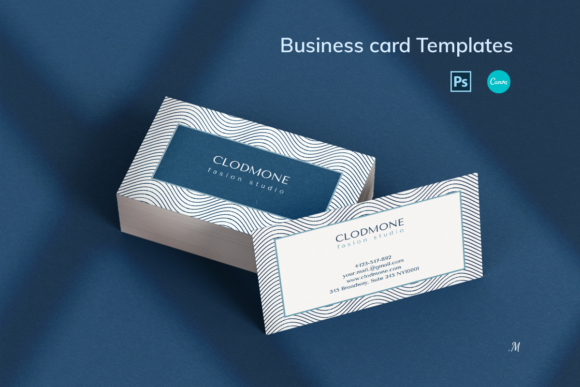
The Editable Elegant Business Card Template is a pre-designed layout that allows users to customize text, colors, fonts, and logo placement to reflect their brand identity. It is available in both Canva and Adobe Photoshop (PSD) formats, making it accessible to users with varying levels of design experience. The templates are set to standard business card dimensions—3.5×2 inches or 90x50mm—with CMYK color profiles and 300 dpi resolution, ensuring print-ready quality.
This template is particularly valuable for professionals in luxury brands, beauty, fashion, law, healthcare, and digital marketing, where visual presentation plays a key role in client perception. It allows for repeated use, making it a cost-effective and time-saving asset for anyone managing multiple branding projects.
Integrating the Template into Your Workflow
One of the strongest advantages of the Editable Elegant Business Card Template is its adaptability to different stages of a project or business process. Here’s how it can be integrated effectively:
- Pre-Launch Branding: Use the template early in your brand development phase to visualize how your logo, color scheme, and typography come together on a physical medium.
- Client Onboarding: For professionals like lawyers, consultants, and freelancers, updated business cards help reinforce credibility during initial client meetings.
- Marketing Campaigns: Align your business card design with campaign visuals to maintain a cohesive brand message across digital and print channels.
- Networking Events: Whether at a conference or a local meetup, a well-designed card makes a lasting impression and facilitates follow-up conversations.
Working with Canva and Photoshop Versions
The template is available in two formats: Canva and Adobe Photoshop (PSD). Each offers distinct benefits depending on your technical comfort level and design needs.
Canva Version: Ideal for users without prior design experience, the Canva version allows drag-and-drop editing through a web-based interface. You can easily upload your logo, adjust font styles, and change background colors without needing to install software. A step-by-step guide is included to help you navigate the editing process efficiently.
PSD Version: For those with basic Adobe Photoshop knowledge, the PSD file provides more advanced customization options. This format is especially useful if you need precise control over layers, effects, and print settings.
Both versions include front and back templates, downloadable fonts, and detailed instructions to ensure a smooth editing experience. You can use the templates repeatedly, saving time when updating contact details or refreshing your brand look.
Key Features to Customize
Each template is designed to be fully editable, giving you full control over the final output. Here are the main elements you can adjust:
- Font Style and Size: Choose from a variety of fonts or upload your own to match your brand typography.
- Color Scheme: Modify background and text colors to align with your brand palette.
- Logo Placement: Upload and position your logo for optimal visibility and balance.
- Contact Information: Update phone numbers, email addresses, websites, and social media handles as needed.
- Graphics and Icons: Add or remove decorative elements to maintain a clean and professional layout.
Practical Tips for Efficient Design
While the Editable Elegant Business Card Template simplifies the design process, a few best practices can help ensure a polished final product:
- Start with a Clear Brand Guide: Know your brand colors, fonts, and logo variations before beginning the design to maintain consistency.
- Use High-Resolution Logos: Low-quality images can appear pixelated when printed, so always use vector or high-resolution files.
- Test Print Before Bulk Orders: Print a sample to check color accuracy and alignment before committing to a large print run.
- Keep Text Readable: Avoid overly decorative fonts for contact information to ensure legibility.
- Save Your Template: Store your finalized Canva or PSD file for future edits, saving time when updates are needed.
Preparing for Print and Digital Use
Once your design is complete, it’s important to prepare it for both print and digital distribution. The templates are already set to industry-standard print dimensions and resolution, but a few final checks can prevent issues:
- Verify Bleed and Margins: Ensure no important text or graphics are too close to the edge of the card.
- Export in Correct Format: Save your final design as a PDF or high-resolution PNG for printing. Canva allows direct download in these formats.
- Use for Digital Networking: Save a digital version to include in email signatures, LinkedIn profiles, or downloadable portfolios.
Long-Term Use and Reusability
The Editable Elegant Business Card Template is designed for longevity. As your business evolves, you can easily update contact details, refresh your color scheme, or integrate new branding elements without starting from scratch. This makes it a valuable asset for entrepreneurs and small businesses that frequently update their marketing materials.
Additionally, the template can be reused across different team members or departments, ensuring consistency in your brand’s visual identity. Whether you're printing cards for a new hire or launching a side business, having a reliable template on hand streamlines the process and maintains a professional standard.
Conclusion
In today’s competitive market, a well-designed business card is more than just a contact tool—it’s a reflection of your brand’s professionalism and attention to detail. The Editable Elegant Business Card Template empowers users to create high-quality, customized business cards with ease, whether using Canva or Adobe Photoshop. By integrating this template into your branding workflow, you can save time, maintain consistency, and present your business in the best possible light—both online and offline.